Secure patient links
Secure patient links for remote EMDR sessions
How secure patient links support simpler remote EMDR access, temporary session entry, privacy-sensitive workflows, and a calmer patient experience.
Start with the clinical frame, not the software
Secure patient links for remote EMDR sessions begins with a clear clinical frame. The therapist needs to know why the session is remote, how the patient will pause or request support, what the target workflow is, and how the session will be documented after the set ends.
For therapists who want patients to join quickly without creating unnecessary accounts, the software should reduce operational friction rather than become the focus. A polished interface matters because remote EMDR already asks both people to hold attention through a screen.
Protect patient focus during bilateral stimulation
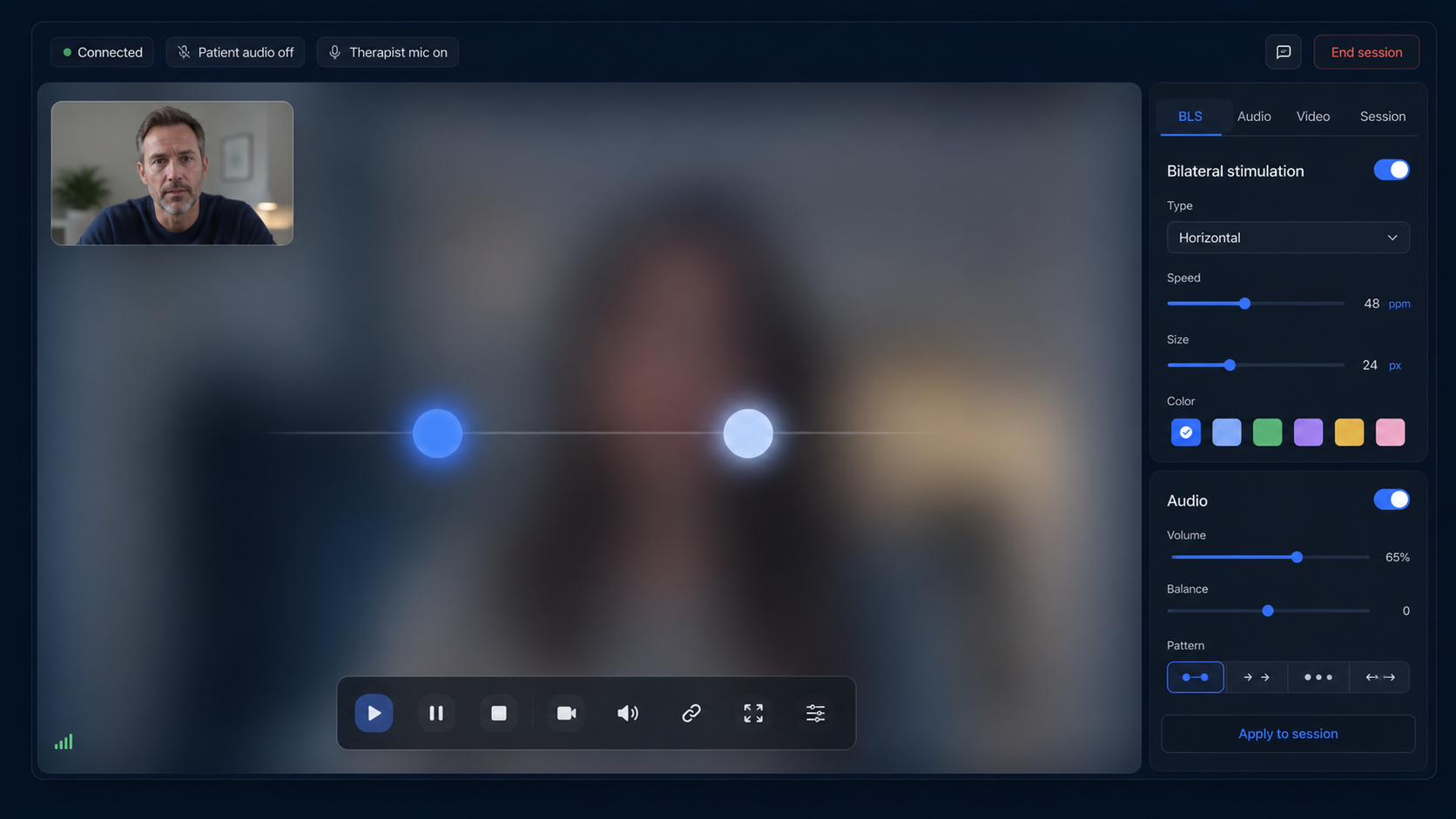
The most important product question is whether secure patient access for remote EMDR helps the patient stay oriented to the task. Stimulus motion should be smooth, audio should be predictable, and controls should be managed by the therapist without cluttering the patient's view.
A patient-facing room should be simple: the stimulus, optional therapist video, connection state, language support, and an emergency or pause action. Anything more can dilute attention during the set.
Give the therapist precise control
Therapists evaluating secure patient links for remote EMDR should look for speed, direction, size, color, set duration, repetitions, audio volume, and left/right synchronization. These controls should be available quickly, without forcing the therapist away from the session context.
Good software also keeps presets and patient-specific settings close at hand. That prevents repetitive setup and helps maintain continuity across sessions.
Make access secure and low-friction
Remote sessions work better when patients enter through a secure, temporary link instead of building a full account before care can begin. The therapist should retain control over the session, while the patient sees only what is necessary.
For privacy-sensitive workflows, avoid putting clinical detail into logs, URLs, or unnecessary interface areas. Clear access boundaries make the product feel calmer and more professional.
Document what matters without overloading the session
Clinical notes, SUD/VOC values, target material, body sensations, and session observations should be available when needed, but they should not dominate the stimulation screen. The therapist needs a workflow that supports documentation while preserving presence.
A good remote EMDR platform separates pre-session setup, live BLS controls, patient profile information, and post-session notes so the clinical record is useful later.
How EMDRSuite fits this workflow
EMDRSuite is designed as a dedicated remote EMDR workspace: therapist account, patient profiles, secure patient links, visual bilateral stimulation, bilateral sounds, video-ready rooms, multilingual patient screens, saved settings, and clinical notes.
It does not replace training or clinical judgment. Its role is to make the technical layer quiet enough that the therapist can focus on the session.
FAQ
secure patient links for remote EMDR
Who is this secure patient links for remote EMDR guide for?
It is for therapists who want patients to join quickly without creating unnecessary accounts. It focuses on workflow, patient access, therapist controls, and software evaluation rather than clinical training.
Does remote EMDR software replace EMDR training?
No. Software supports the workflow, but therapists remain responsible for training, screening, informed consent, safety planning, documentation, and local legal requirements.
Why avoid screen sharing for BLS?
Browser-native BLS can be smoother and simpler for the patient because the therapist sends commands and the patient's device renders the stimulus directly.
What should a patient see during online BLS?
A focused stimulus area, optional therapist video, connection state, language they understand, and a clear way to pause or request support.
References
Secure patient links for remote EMDR sessions
EMDRSuite
Put the guide into practice with EMDRSuite
Run remote EMDR with visual BLS, bilateral sounds, secure patient links, video-ready sessions, saved settings, and notes.