EMDR software comparison

Remote EMDR software comparison for therapists

Compare remote EMDR software by patient access, integrated video, visual and auditory BLS, reconnection, security evidence, workflow, languages, and price.

remote EMDR software comparisononline bilateral stimulationEMDR software for therapists
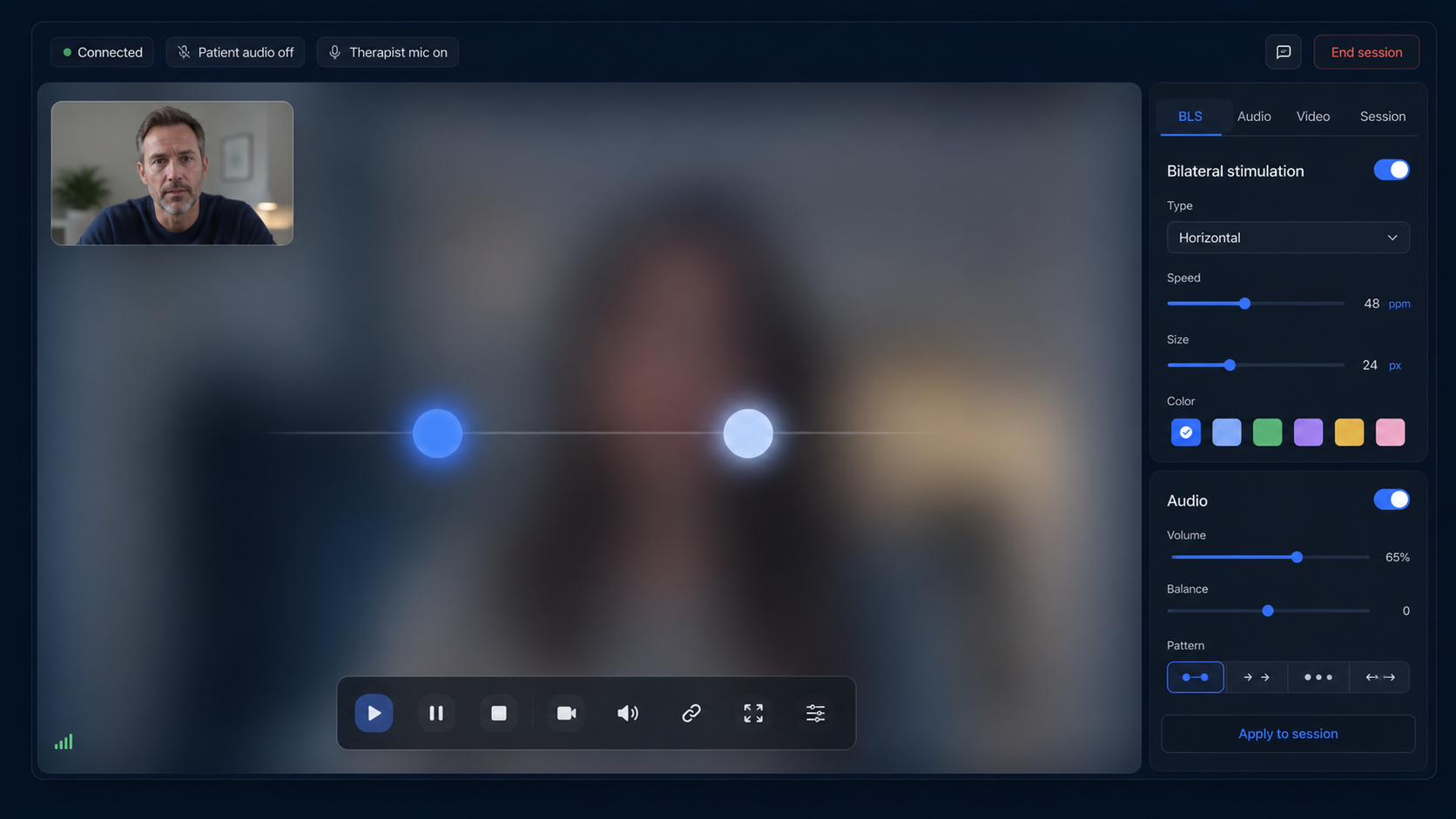
EMDRSuite therapist session with online bilateral stimulation controls

Product proof

Use this page to evaluate remote EMDR software options without copying another product's brand, interface, or proprietary approach.

remote EMDR software comparison
EMDRSuite
remote EMDR software
online EMDR tools

Why EMDRSuite

Included in EMDRSuite

A dedicated workspace instead of stitched-together apps

remote EMDR software comparison should not require therapists to juggle video, timers, audio tabs, patient links, and clinical notes. EMDRSuite brings the session flow into one focused interface so the therapist can stay clinically present.

Therapist-led visual and auditory BLS

Run smooth bilateral movements in the browser, adjust speed, size, direction, shape, color, set duration, repetitions, and bilateral audio without relying on screen sharing.

Built for real remote sessions

Patients enter through a secure link, see a simple multilingual session screen, can pause when needed, and receive synchronized visual and audio stimulation controlled by the therapist.

Privacy-aware clinical workflow

EMDRSuite separates patient access from therapist accounts, avoids unnecessary clinical data in logs, and gives the practice a cleaner foundation for privacy-sensitive remote care.

Therapist buyer's guide

A remote EMDR software checklist you can actually test

Do not choose from a feature logo or a compliance badge alone. Test the patient journey, live BLS behavior, recovery after interruption, documentation, contractual evidence, and total workflow before using any platform in practice.

Patient setup

What EMDRSuite provides

The patient joins from a private, expiring browser link without creating an account.

What to verify in any platform

Count every install, account, permission, tab, and click required before the patient can see the room.

Integrated video

What EMDRSuite provides

Camera, microphone, therapist controls, and the patient room are part of the same session workflow.

What to verify in any platform

Confirm whether video is built in or requires a separate meeting app, subscription, link, or window.

Visual BLS delivery

What EMDRSuite provides

The stimulus renders in the patient's browser while the therapist controls speed, direction, shape, color, size, duration, and repetitions.

What to verify in any platform

Test what the patient sees under normal bandwidth; do not infer stimulus quality from the therapist preview or screen sharing.

Bilateral audio

What EMDRSuite provides

Alternating left-right audio runs with the visual pacing and includes patient-side volume control.

What to verify in any platform

Use headphones on the patient device and check channel alternation, browser permissions, volume, and synchronization.

Patient safety signal

What EMDRSuite provides

A patient panic or pause signal is relayed live to the therapist during the room session.

What to verify in any platform

Ask the patient to trigger the control and confirm what stops, what the therapist sees, and what happens if audio or video fails.

Reconnect behavior

What EMDRSuite provides

After a patient reconnects, the active BLS configuration and running state are replayed to the room.

What to verify in any platform

Disconnect Wi-Fi during a test set, rejoin, and verify room authorization, state restoration, and safe therapist control.

Therapist authentication

What EMDRSuite provides

Therapist routes require an authenticated account; patient access uses a separate session token.

What to verify in any platform

Try private routes while logged out and try an expired or altered patient link. Access should fail safely.

Clinical workflow

What EMDRSuite provides

Patient profiles, sessions, saved BLS settings, notes, worksheets, and session completion remain in one workspace.

What to verify in any platform

Map where each item is stored, who can see it, whether it is essential, and what must still be documented elsewhere.

Language coverage

What EMDRSuite provides

Therapist and patient flows are available in English, Spanish, Portuguese, and French.

What to verify in any platform

Test the actual patient room and controls, not only translated marketing pages.

Security and contracts

What EMDRSuite provides

Public security, privacy, DPA, subprocessor, and HIPAA/BAA information is available for review.

What to verify in any platform

Check encryption, access controls, retention, subprocessors, incident terms, data location, and whether your practice needs a signed DPA or BAA.

Pricing and cancellation

What EMDRSuite provides

Try EMDRSuite free for 14 days without a card. The trial starts when you create your account and ends without an automatic charge. Afterwards, choose whether to subscribe for €24.99/month through Stripe.

What to verify in any platform

Confirm the trial clock, card requirement, taxes, usage limits, renewal price, cancellation route, exports, and deletion terms.

Operational evidence

What EMDRSuite provides

A public health endpoint and external status page report application, database, realtime relay, and service monitoring.

What to verify in any platform

Check current status, incident history, support path, and what fallback you will use if the service is unavailable.
Before subscribing

Run one no-patient-data rehearsal

Use fictional names and no clinical material. A short two-device rehearsal reveals more than a static feature list.

  1. 1

    Join as a new patient

    Open the session link on a second device or private window. Record whether an install, account, extra tab, or separate video link is required.

  2. 2

    Test the live room

    Enable camera and microphone, use headphones, run visual and auditory BLS at 60 ppm, change settings, and trigger the patient safety signal.

  3. 3

    Force an interruption

    Disconnect the patient device, reconnect, and verify authorization, presence, BLS state restoration, stop behavior, and session completion.

  4. 4

    Review evidence, not badges

    Read security, privacy, DPA, subprocessors, BAA terms, pricing, cancellation, retention, deletion, and the public service status before adding real patient data.

Evidence and terms to review

EMDRIA lists online BLS resources without endorsing vendors. HHS advises covered providers to assess telehealth technology and obtain a BAA when the vendor relationship requires one. Each practice remains responsible for its own clinical, legal, privacy, and procurement review.

FAQ

remote EMDR software comparison

Does a patient need an EMDRSuite account or installation?

No. The patient opens a private, expiring session link in a supported browser. Test the exact device, camera, microphone, audio, and network that will be used before a clinical session.

Is video integrated or does EMDRSuite require screen sharing?

Video and the patient room are integrated. Visual BLS renders in the patient's browser and receives therapist controls, so the stimulus does not depend on sharing the therapist's screen.

What happens when the patient reconnects?

The room reauthorizes the patient link and replays the current BLS configuration and active state. Practices should still agree on a separate reconnection and emergency plan.

Does a security or HIPAA badge prove a platform fits my practice?

No. Review the actual security controls, privacy terms, retention, subprocessors, DPA, BAA availability, data location, incident terms, and your own legal obligations.

How should I compare remote EMDR platforms?

Use two devices with fictional data. Test patient entry, video, headphones, BLS at 60 ppm, the safety signal, a forced disconnect, reconnection, session closure, private-route protection, and deletion terms.

What does the EMDRSuite trial cost?

14 days free. No card. No automatic charge. Afterwards, choose €24.99/month.

Related EMDR resources

Build a calmer remote EMDR workflow

EMDRSuite

Build a calmer remote EMDR workflow

Start with a focused workspace for BLS, patient links, video-ready sessions, notes, and multilingual patient access.

Start 14-day free trial