EMDR video workflow
How an integrated EMDR video session works
A practical walkthrough of browser video, therapist-controlled bilateral stimulation, patient access, pause signals, and contingency planning in one remote EMDR room.
By the EMDRSuite Editorial Team
Product claims checked against the current EMDRSuite code and interface.
No independent clinical reviewer is named for this guide.
Before the call: create the clinical and technical frame
An integrated room does not remove the preparation required for remote trauma work. Before sending a link, the therapist should confirm informed consent, the patient's physical location, emergency contacts, privacy at both ends, a backup communication channel, and what will happen if the connection fails.
The software layer should then be tested: compatible browser, stable connection, headphones when bilateral audio is planned, camera framing, microphone input, and enough screen space for the visual stimulus. These checks protect session time from avoidable troubleshooting.
Joining through a private patient link
The therapist creates the session from an authenticated workspace and shares a private link through the practice's agreed communication channel. The patient opens a focused room without creating a separate account, while therapist-only profiles, settings, and notes remain outside that view.
A low-friction link is useful only when access boundaries remain clear. The URL should not contain clinical details, and the practice should treat the link as sensitive session access rather than as a public meeting address.
Starting video without losing the treatment context
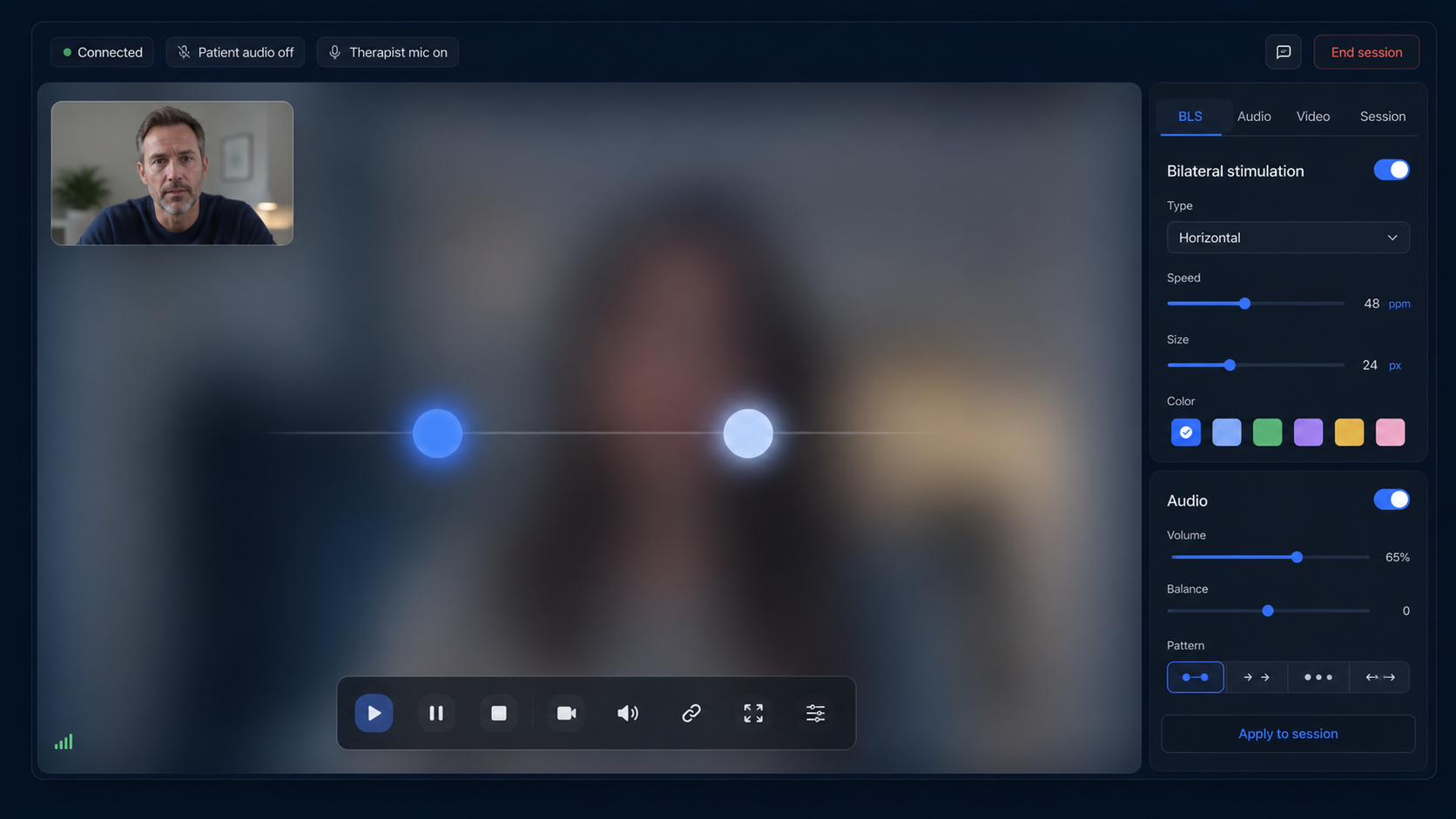
In EMDRSuite, therapist and patient can enable camera and microphone inside the browser room. The conversation and preparation phase can therefore happen beside the same controls that will later run the bilateral set.
Video is not required to dominate the screen throughout the set. The therapist can reduce visual distraction when clinically appropriate while retaining the patient pause signal and connection status.
Running therapist-controlled visual and auditory BLS
The therapist selects movement direction, speed, stimulus size, shape, color, duration, repetitions, and optional alternating audio. Start, pause, and stop commands are synchronized to the patient's room without screen sharing.
The patient receives the visual movement directly in the browser and can signal an immediate pause. The therapist remains responsible for pacing, observation, consent, and decisions about whether remote delivery remains appropriate.
Ending the set and documenting the session
After stopping the stimulus, the therapist returns attention to assessment, grounding, and the next clinical decision. Session settings can be retained for continuity, while notes remain in the therapist workspace rather than the patient room.
An integrated workflow reduces switching between a call, BLS tab, timer, and document. It does not replace a backup plan: practices should still know how to reconnect, move to another approved channel, or end safely when technology becomes unreliable.
FAQ
integrated EMDR video session
Does EMDRSuite include video and bilateral stimulation in the same room?
Yes. Browser video and audio can run alongside therapist-controlled visual and auditory BLS in the same remote session workflow.
Does the patient need an account?
No. The patient joins with the private session link; therapist records and controls stay in the authenticated workspace.
Can the therapist hide video during a visual set?
The interface supports reducing or hiding video so the visual stimulus can remain the main focus when the therapist considers that appropriate.
What happens if the connection fails?
The software reconnects where possible, but the therapist still needs a pre-agreed backup communication method and clinical contingency plan.
References
How an integrated EMDR video session works
EMDRSuite
Put the guide into practice with EMDRSuite
Run remote EMDR with visual BLS, bilateral sounds, secure patient links, video-ready sessions, saved settings, and notes.
Continue with related EMDR guides