EMDR equipment buying guide
EMDR equipment for therapists: what to test before buying
Compare light bars, tappers, headphones, browser BLS, video, devices, and backup plans with tests therapists can run before buying.
By the EMDRSuite Editorial Team
Product claims checked against the current EMDRSuite code and interface.
No independent clinical reviewer is named for this guide.
1. Confirm the remote-care plan
Document consent for remote work, the patient's current location, emergency contacts, local crisis resources, privacy conditions, and a backup phone or approved communication route.
Technology readiness is only one part of appropriateness. The qualified therapist decides whether remote delivery fits the patient, phase of work, and current clinical risk.
2. Test the patient device and browser
Use a current browser on a laptop or desktop when possible, close bandwidth-heavy applications, connect power, and confirm that the patient can open the private link before the appointment.
Check that the stimulus area is visible at a comfortable size and that browser zoom, accessibility settings, or small screens do not distort the movement path.
3. Check camera, microphone, and bilateral audio
Confirm the selected camera and microphone, useful framing, adequate light, and stable audio. Headphones are important when left-right bilateral sound is part of the planned set.
Test volume at a comfortable level before processing. The patient should know how to mute, stop camera sharing, and request a pause.
4. Prepare BLS settings and patient access
Select a starting movement, speed, color, shape, size, duration, repetitions, and audio pattern appropriate to the therapist's plan. Saved settings can reduce repetitive setup, but they should still be reviewed for the current session.
Generate the patient link close to the appointment, share it through the agreed channel, and avoid placing identifying clinical information in the message or URL.
5. Rehearse failure and closure
Agree on what both people will do if video freezes, audio drops, or the patient disappears from the room. Keep the backup contact available without exposing it in public notes or links.
End with enough time for grounding, assessment, documentation, and technical follow-up. Record meaningful clinical information, not unnecessary technical detail or sensitive content in logs.
EMDR equipment for therapists
Test the whole delivery path before buying another device
A light bar, tapper, headset, browser tool, and integrated platform solve different operational problems. Compare what the patient receives, what the therapist controls, and how the setup fails before comparing feature counts.
Patient and therapist devices
What it may support
A current computer or tablet, useful screen, stable power, supported browser, and realistic network on both sides.
Proof before purchase
Run the complete room on the exact devices and networks planned for sessions; inspect load, rotation, zoom, movement, and heat or battery limits.
Failure boundary
A fast therapist computer cannot compensate for a small, unsupported, overloaded, or disconnected patient device.
Detailed test
Connection troubleshootingCamera and microphone
What it may support
Bidirectional conversation, useful framing, device selection, and clear permission indicators in the browser and operating system.
Proof before purchase
Grant, deny, restore, switch, mute, and reconnect each device; confirm speech and image from both rooms rather than relying on a local preview.
Failure boundary
Permission, hardware, operating-system privacy, another app, or network transport can fail independently.
Detailed test
Camera and microphone permissionsStereo headphones and adapters
What it may support
Distinct left-right playback, privacy, comfortable volume, and an audio route that matches the patient's device.
Proof before purchase
Test channel identity, mono settings, Bluetooth, cable or adapter, autoplay, volume, and synchronized playback with neutral audio.
Failure boundary
A working microphone or video call does not prove stereo output; speakers or accessibility settings may merge channels.
Detailed test
Bilateral sound testPhysical light bar
What it may support
A dedicated in-room visual path when placement, viewing distance, controls, cleaning, power, warranty, and service fit the practice.
Proof before purchase
Observe useful speed and range, edge behavior, brightness, noise, pause, controller reach, cable strain, replacement terms, and a complete failure rehearsal.
Failure boundary
Hardware purchase does not establish clinical suitability, remote control, accessibility, reliability, or a backup modality.
Detailed test
Light bar settings and limitsTappers or tactile pulsators
What it may support
A physical tactile route when the trained therapist, patient, setting, hygiene process, and device instructions support it.
Proof before purchase
Test pairing, independent sides, intensity range, latency, patient stop, battery, cleaning, cables, replacement parts, and what happens after disconnect.
Failure boundary
A web animation cannot create tactile input, and EMDRSuite does not control external tappers or claim that one modality is superior.
Detailed test
Visual, auditory, and tactile BLSBrowser-based visual and audio BLS
What it may support
Local rendering on the patient's screen, therapist control, stereo audio, a patient pause, and access without shipping equipment.
Proof before purchase
Use two real devices to test smoothness, commands, audio unlock, pause, reload, mobile rotation, interruption, and re-entry without clinical content.
Failure boundary
Browser delivery depends on screen, audio route, permissions, network, and compatibility; a public animation is not therapist-led care.
Detailed test
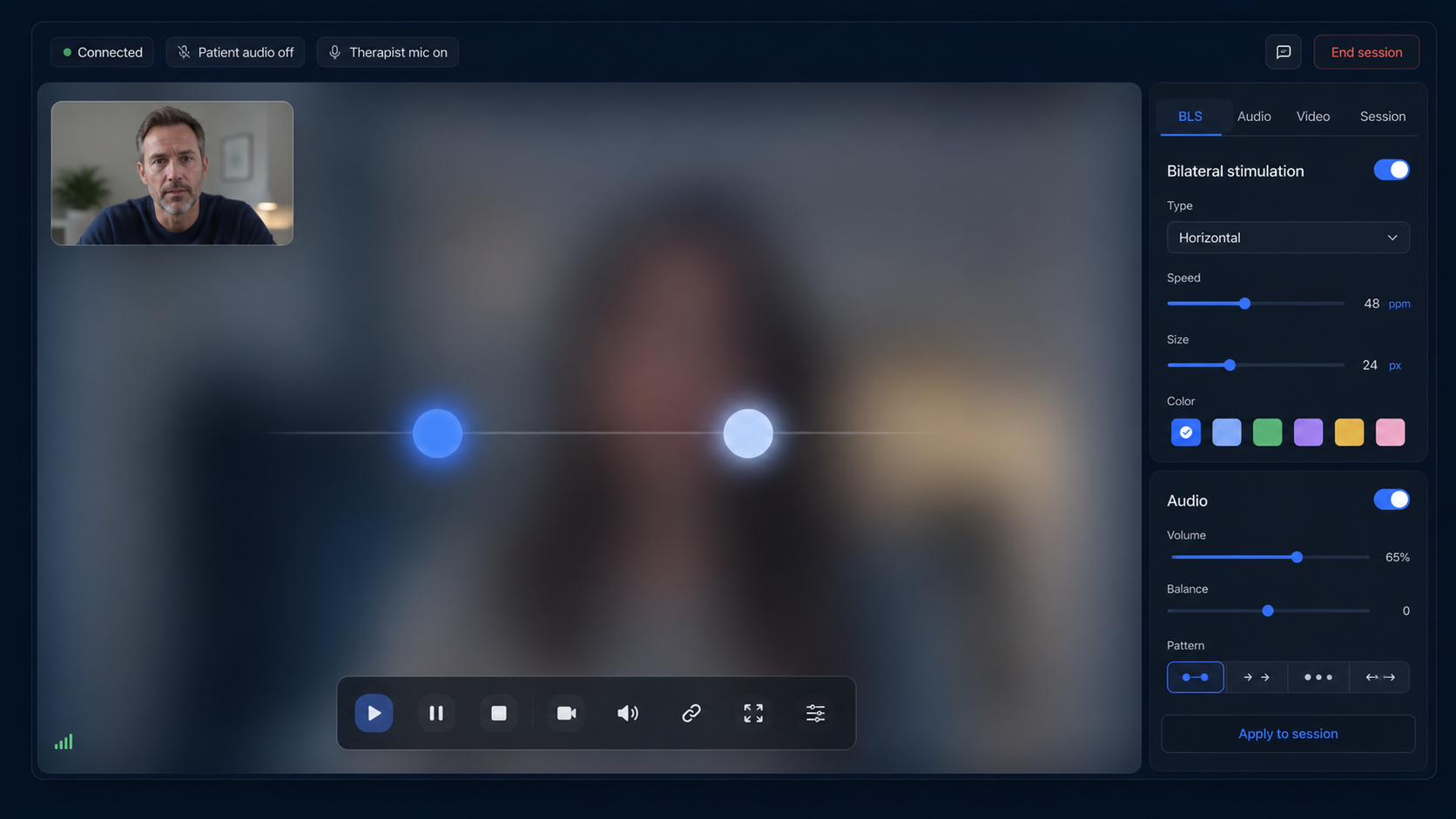
Online bilateral stimulationIntegrated video and BLS workspace
What it may support
One patient entry, bidirectional video, locally rendered BLS, therapist controls, session state, and professional notes with fewer tool switches.
Proof before purchase
Rehearse invitation through closure on two devices, including access boundaries, video hiding, pause, TURN relay, reconnection, records, and end state.
Failure boundary
Integration reduces handoffs only when every component works; it does not remove consent, contingency, contracts, or clinical responsibility.
Detailed test
Integrated session workflowPower, contact, and fallback kit
What it may support
Chargers, a separate contact route, current location and emergency information, a tested stop plan, and an alternative way to close the encounter.
Proof before purchase
Disconnect power or network in a non-clinical rehearsal and observe stimulus stop, displayed state, contact recovery, reconnection, and deliberate closure.
Failure boundary
A backup item is useful only when both people know when and how to use it; technical recovery is not automatic clinical permission to resume.
Detailed test
Remote contingency planThis is a vendor-neutral procurement framework, not a brand ranking, medical-device determination, treatment recommendation, or claim that equipment improves outcomes. Verify current specifications, warranty, support, privacy, accessibility, contracts, and local requirements directly before purchase.
FAQ
EMDR equipment for therapists
What equipment does a patient need for EMDR online?
A compatible browser, stable connection, suitable screen, camera and microphone for video, and headphones when alternating bilateral audio is used.
Should the technology be tested before the first session?
Yes. A short test reduces uncertainty around permissions, devices, audio channels, screen size, and the patient link.
Is a backup contact method necessary?
Yes. Remote sessions need a pre-agreed contingency route in case the browser, internet connection, or video fails.
Does this checklist replace a clinical protocol?
No. It covers operational preparation and does not replace EMDR training, supervision, clinical assessment, or local professional requirements.
References
EMDR equipment for therapists: what to test before buying
EMDRSuite
Put the guide into practice with EMDRSuite
Run remote EMDR with visual BLS, bilateral sounds, secure patient links, video-ready sessions, saved settings, and notes.
Continue with related EMDR guides